
Subscribe and manage your subscription
Under Settings → Subscription you see your current plan, usage and features, and choose a plan. Only admins and super admins manage subscription, seats and credits.
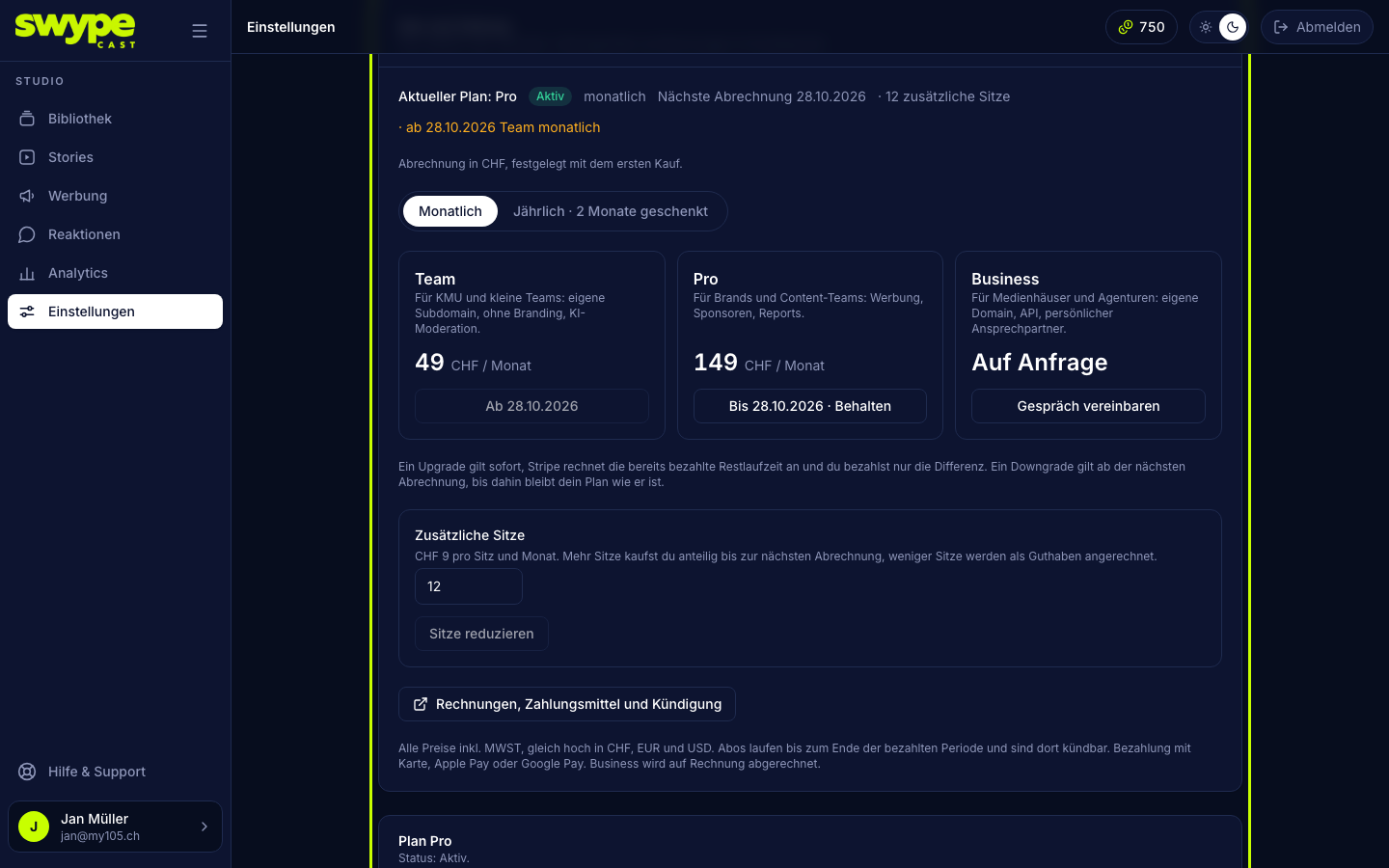
Choose a plan and pay
- Pick Monthly or Yearly · 2 months free.
- Click Start now on the plan you want. You land at our payment partner Stripe.
- Pay by card, Apple Pay or Google Pay. The subscription renews automatically, monthly or yearly. Companies can enter their VAT number there.
- Back in the studio the plan is active at once.
If you already chose a plan when you signed up, it is shown as a note at the top and highlighted. Complete the purchase whenever you are ready.
Change plan
With a running subscription the button reads Switch (or Switch to yearly on your own plan).
- Upgrade (higher plan, or monthly to yearly): applies immediately. Stripe credits the unused rest of the paid period, you only pay the difference.
- Downgrade (lower plan, or yearly to monthly): applies from the next billing date. The studio asks first. Until then your plan keeps all its features, and Keep cancels the scheduled change.
Invoices, payment method, cancelling
Invoices, payment method and cancellation opens Stripe's customer portal: download invoices, change the payment method, cancel. After cancelling, the plan runs until the end of the paid period, then the organisation moves to Free. If a payment fails, you see a note at the top; update your payment method, otherwise the organisation falls back to Free.
Seats
In Team, Pro and Business you book more team places under Additional seats: CHF 9 per seat and month, or CHF 90 per seat and year when paid yearly.
- Enter the number of additional seats you want.
- Click Buy seats. You pay for extra seats pro rata until the next billing date.
- You lower the number with Reduce seats; the rest is credited on the next invoice.
Views
Every plan includes a number of views per month. There is no overage billing: once the views are used up, your stories show a short notice instead of the player until the start of next month. At 90 % you get an e-mail and a note in the studio. Switching to a bigger plan brings the player back right away.
AI credits
Under Settings → AI credits you see this month's included credits and the ones you bought, and you buy packs: 250 credits for CHF 19, 750 for CHF 49, 2,000 for CHF 99. Included credits expire at the end of the month, purchased ones never. More under Generating clips with AI.
Business
Business is not booked online but invoiced. Click Book a call or write to us via support.