
Help Center · Stories and clips
Audio and image as a clip
Not every piece of content is a video. A clip can also consist of a soundtrack and a picture: for example an excerpt from your podcast with the cover, a voice message with a photo, or music with a poster.
What you need
- An audio file (MP3, M4A, AAC or WAV), at most 90 seconds long. Longer soundtracks are refused, so trim them first.
- A picture (JPG, PNG or WebP), ideally portrait 9:16. Pictures in another format are shown in full, with a soft background made from the picture itself; nothing is cropped. A very large picture is made smaller during the upload.
How it works
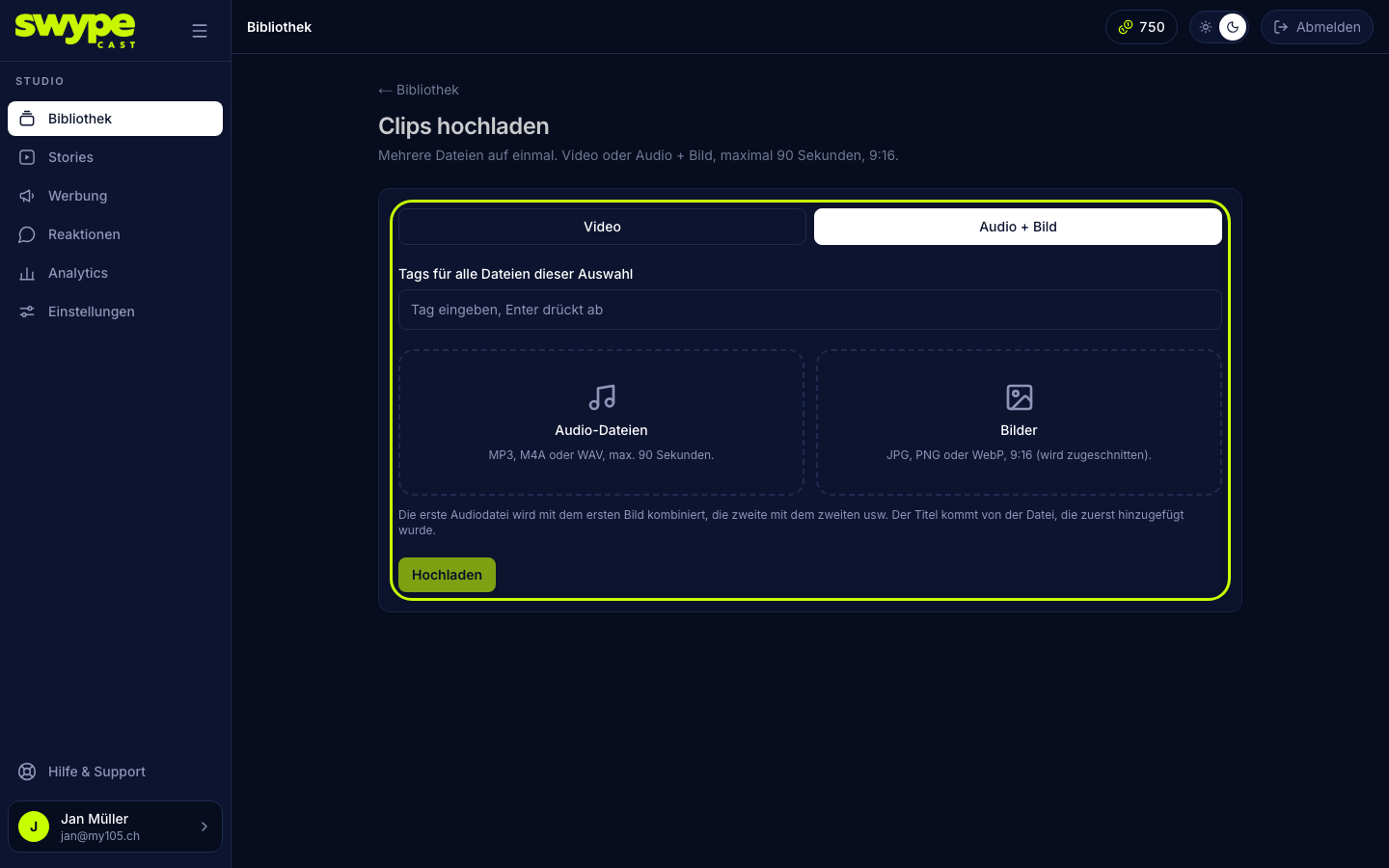
- Open Library → Upload and switch to the Audio + image tab.
- Drag the audio files into the Audio files field and the pictures into the Images field.
- SwypeCast forms pairs in the order you added the files: first audio + first picture, second audio + second picture, and so on. The title comes from the file you added first.
- A file without a partner stays visible and waits for the next selection.
- Click Upload clips.
You can swap the soundtrack and the picture separately later: the clip's page has Replace audio and Replace image for that, see Editing a clip.
In the player
Viewers see the picture, hear the soundtrack, and the progress bar runs along. Reactions, comments and buttons work as with any video clip.
Was this helpful?